
Cost Overheads
Costing overheads may be applied at two independent stages:
1. To a formulation
2. To a finished goods item
The overheads are applied in the form of overhead parameters. These overhead parameters are similar to raw material cost entries in that once entered they may be called up for use in any formulations (or finished goods items).
If the value of an overhead parameter is changed it instantly changes in all formulations containing that overhead parameter.
The overhead parameters are addressed by means of a code in a similar fashion to raw material entries, except that overhead parameters can only have a NUMERIC CODE IN THE RANGE 1 TO 999. The numeric codes are automatically generated.
ENTERING OVERHEAD PARAMETERS
Menu Option: Files > Overheads
This shows a table of your existing overheads. Press insert to add a new overhead.
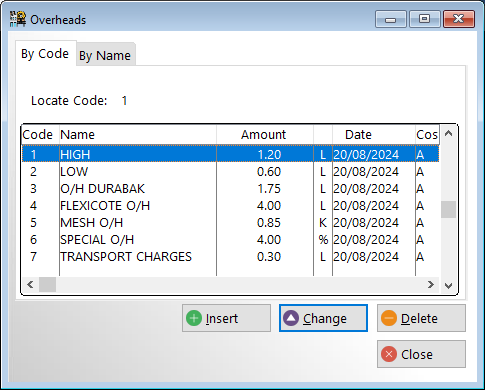
Adding a new overhead:
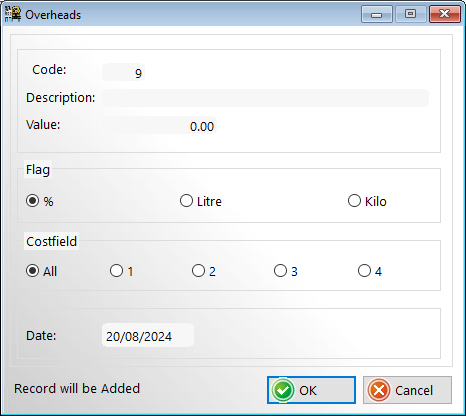
Code: Automatically generated numeric code. You can change this code if desired but it must be unique.
Description: Any text to describe the overhead
Value: The numeric value for this overhead
Flag: How the numeric value is to be applied. As a percentage of the raw material cost or as a fixed amount per litre or kilo.
Costfield: A to apply to all cost fields (default) 1, 2 , 3 or 4 to apply ONLY to the selected cost field. This means that you can have separate sets of overheads for each cost field.
This is particularly useful if you are using the cost fields for costing products at different production centres.
Date: The date when the overhead parameter was last updated.
ENTERING OVERHEADS FOR A FORMULATION
Overheads can be entered from 2 separate menu options. It makes no difference to the final result which menu option is used.
1. Menu option: Files > Formulation (code or name) (Use this menu option when you wish to add overheads to newly created formulations)
2. Menu option: Costing > Formulations (Use this menu option when you wish to add overheads to existing formulations or where you wish to do 'What if ' costing experiments)
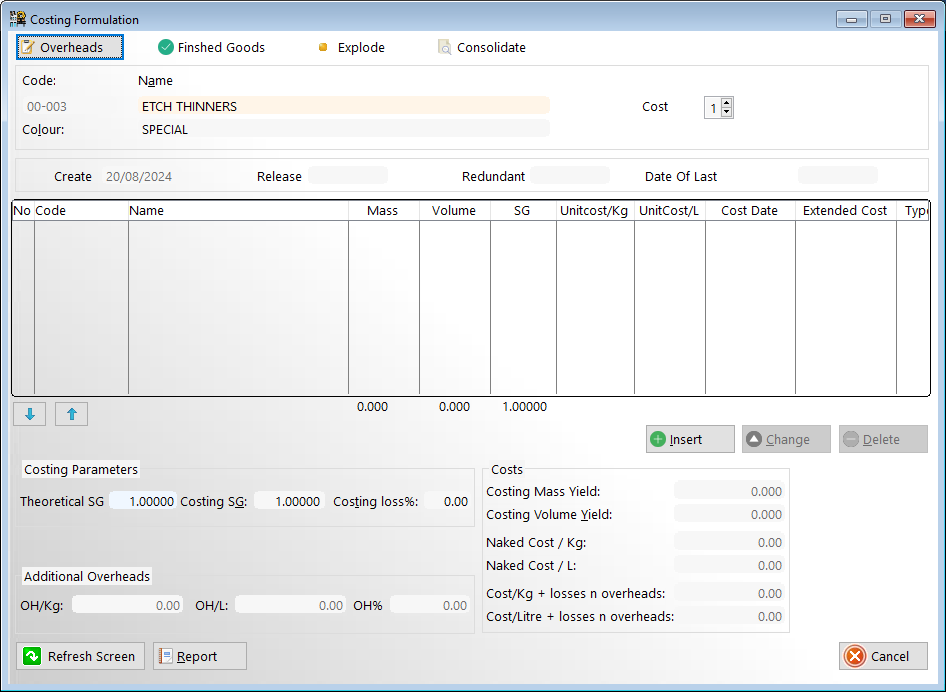
Click on the overheads drop-down menu option at the top of the formulation costing screen
This will open a window showing the existing list of overheads. Click <Insert> to add a new overhead.
Press the <insert> button to add a new overhead. Press the <enter> key on the '0' code to open the window showing existing overhead parameters then select the desired overhead parameter.
Any number of overhead parameters may be applied to a formulation. The overheads are applied in the order of entry.
The data for an overhead parameter may consist of a currency amount per unit mass or volume depending on the setting of the mass switch, or a percentage. If a currency amount is entered then that amount will be added to the unit cost per mass or unit cost per litre, as entered. Inter-conversion from mass to volume or vice versa will be effected using the Costing SG for the specific formulation. A percentage entry will be applied to both cost per unit mass and cost per unit volume. A percentage entry is applied to the cost including any overheads preceding that entry. The total resultant value of all the overheads for the formulation are shown at the bottom of the window (OH /Kg, OH /l(itre) OH % (percent)