
Assign Raw Materials to a Supplier
Associating Raw Materials with Suppliers
MENU OPTION: Files > Raw materials > Suppliers > Raw Materials by Supplier
The following table shows a list of raw material suppliers:
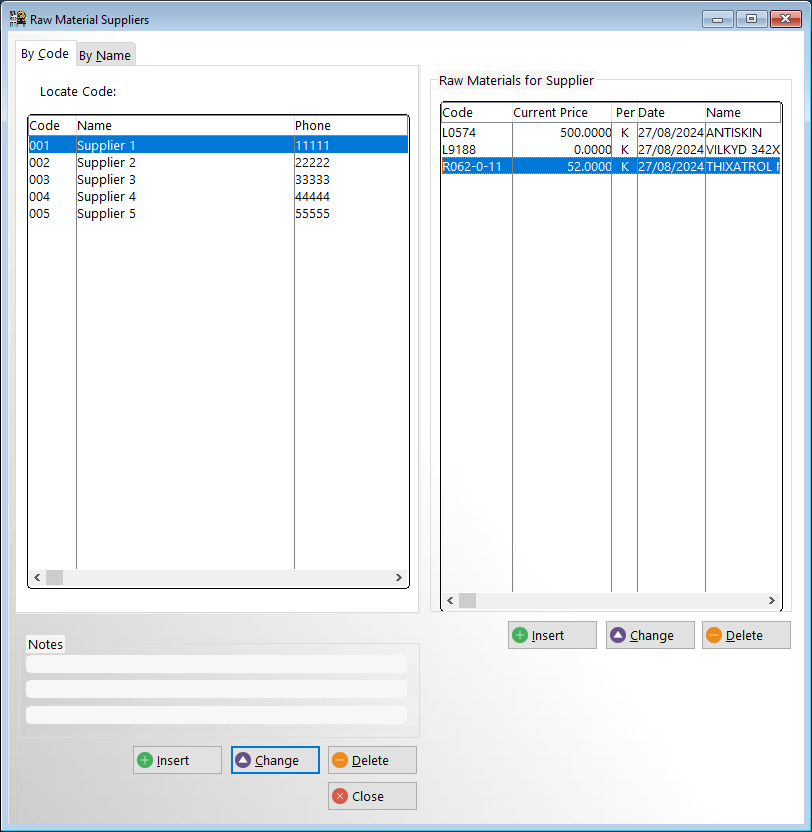
LEFT CONTROL BUTTONS:
Insert: Add a new supplier (Enter name address phone, fax etc)
Change: Change supplier details
Delete: Delete a supplier and his link to the raw materials he used to supply (raw materials are not deleted)
RIGHT CONTROL BUTTONS:
Insert: Assign a raw material to a supplier
Change: Change highlighted raw material
Delete: Delete the highlighted raw material
From this window you may insert/change/delete the raw materials supplied by this supplier together with the suppliers current cost and lead time.
Suppliers by Raw Materials
MENU OPTION: Files > Raw Materials > Suppliers by Raw Material
View the suppliers of any raw materials
You can add/delete/change suppliers, their prices and lead times from this screen.
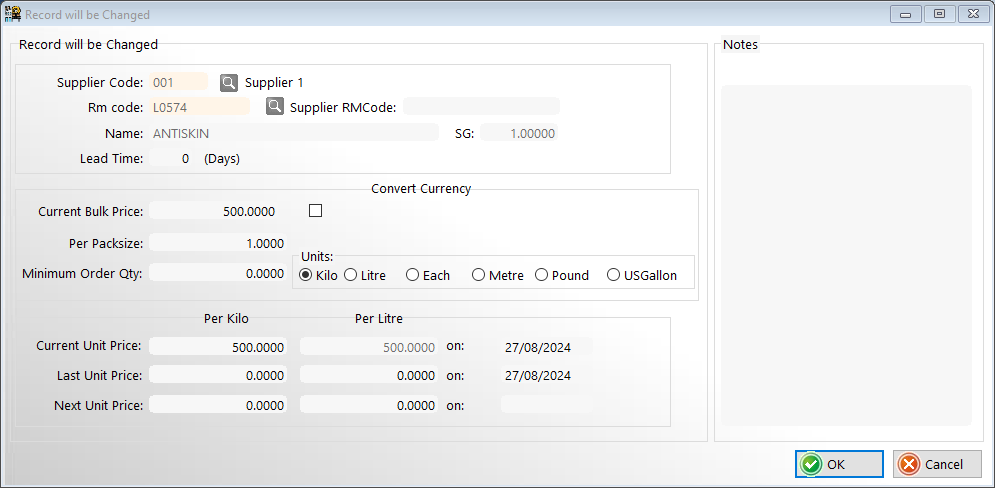
The supplier bulk price and pack size will be used to calculate a unit price for the material. If the supply units radio button is checked as 'Litre' then the unit cost will be converted to a cost per kilo using the S.G. for that material. To enter or change the S.G. for a material see 'Files > Raw Material > Master File.'
The standard prices for all raw materials (as entered and updated in 'Files > Raw Material > Costs' are stored as cost per kilo.